LOW-STOCK ALERTS BY LOCATION

Signal.

Know which stock needs your attention.

Set a threshold for a variant at a location. Check available inventory in Shopify admin, or enable automatic checks and send grouped low-stock alerts to your verified email destination.

Free: 25 saved variant/location pairs. Growth: $12 USD per 30 days for up to 1,000 pairs. No percentage or per-order app fee.

Public Shopify listing verified October 22, 2026.

SIGNAL · SEE IT BEFORE YOU INSTALL

Check the stock at the right location.

See threshold configuration and timestamped inventory readings in a narrated feature overview made from actual development-store screenshots. This video takes less than a minute.

Feature overview using genuine development-store screenshots and synthetic narration. Products and stock readings are test fixtures. It does not show a complete setup recording, email-inbox delivery or customer outcome.
Read the Signal walkthrough
  1. Enable inventory checks, choose a variant and location, set a threshold and save an enabled monitor. Run a manual check and inspect the available quantity and timestamp.
  2. For digests, enable automatic checks, verify the recipient email address and separately enable alert emails. Review scan and email status, then confirm receipt in the intended inbox.
  3. Free allows 25 saved variant/location pairs; Growth allows 1,000. Paused monitors count. Free targets scans about hourly and Growth about every 15 minutes; large lists and provider delays can take longer.
  4. Signal reads inventory without changing stock. No storefront theme block is required. It does not forecast demand, place supplier orders or assume unavailable inventory is zero.

Start free: 25 saved variant/location pairs. Compare plans and limits.

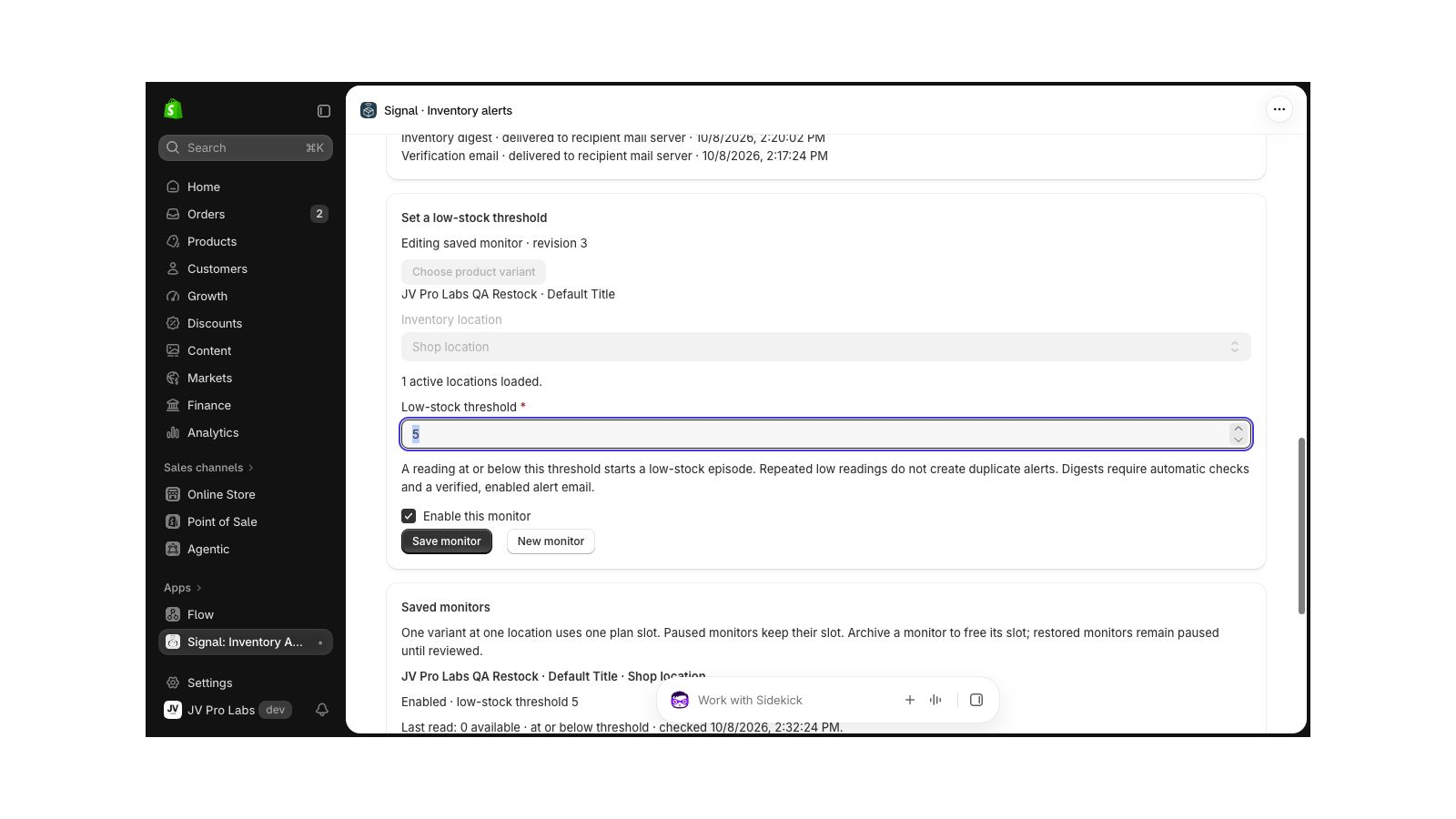
Signal in a Shopify development store showing a saved variant/location monitor and an example low-stock threshold.
Signal in an installed Shopify development store. The QA products, stock reading and threshold of 5 are test fixtures, not a live merchant alert or a recommended replenishment rule.

WHAT IT DOES

Watch the variant at the right location.

  • Choose a product variant, location and low-stock threshold.
  • Read available stock with its last-checked timestamp.
  • Run a manual check or enable automatic monitoring.
  • Group newly low-stock episodes into a digest for a verified, enabled email address.
  • Archive saved monitors and restore them paused for review.

Signal reads Shopify inventory without changing it. Unavailable or untracked inventory is shown explicitly. It does not forecast demand, reorder products or guarantee real-time stock updates.

GETTING STARTED

Check the reading before enabling alerts.

Signal runs in Shopify admin. No storefront theme block is required.

  1. Install Signal and review its product, inventory and location access and plan terms.
  2. Enable Allow inventory checks and save. Choose a product variant and inventory location, set a threshold, enable the monitor and save it.
  3. Use Check inventory. Confirm the location, reading and timestamp against the stock you intend to monitor.
  4. Enable automatic checks to monitor while you are away. Free targets a new scan about hourly; Growth about every 15 minutes. Large lists and provider delays can take longer.
  5. Enter an email address your team controls, request its eight-digit code and verify it. Then separately choose Enable alert emails. Automatic checks and a verified, enabled recipient are required for digests.
  6. Review scan and email status and confirm receipt at the intended destination. Show the team how to stop checks, stop emails or archive a monitor.

Follow the location-specific low-stock setup and test guide.

FIXED PRICING

Start with the stock that matters.

Free

$0 USD / 30 days

25 saved variant/location pairs. Automatic scans target about hourly. Manual checks and verified-recipient digests are included.

Growth

$12 USD / 30 days

Up to 1,000 saved variant/location pairs. Automatic scans target about every 15 minutes. The public listing offers a seven-day trial; review applicable trial and renewal terms on Shopify.

No percentage or per-order app fees. Scheduling targets are not freshness or delivery guarantees. Shopify displays plan terms before approval.

Need to monitor more stock locations?

Growth supports up to 1,000 variant/location pairs and targets a new automatic scan about every 15 minutes. Free supports 25 pairs with an hourly target. Provider delays and large lists can take longer.

Signal: what changes between plans
IncludedFreeGrowth
Saved variant/location pairs25Up to 1,000
Automatic scan targetAbout hourlyAbout every 15 minutes
Manual inventory checksIncludedIncluded
Verified, enabled recipient digestsIncludedIncluded
Percentage or per-order app feeNoneNone
What counts toward the Free limit?

One variant at one location uses one saved-pair slot. The same variant at two locations uses two. Paused monitors keep their slot. Archiving frees a slot while retaining the record; restored monitors stay paused until reviewed. These are saved-monitor limits, not monthly order or email quotas.

How do I move to Growth?

Open Signal in Shopify admin → View plans → review Growth on Shopify. Read the trial, renewal and plan terms before approving a change.

Growth is $12 USD every 30 days. Review the full plan terms on Shopify before approving.

Set thresholds and check the monitoring and email controls.

Start with Free. Start with up to 25 saved pairs. Check the correct variant, location and threshold before enabling automatic checks and alert emails.

Install Signal on Shopify

BEFORE YOU INSTALL

Know what each alert means.

Does a pair mean a product or an email?

One variant monitored at one location uses one saved-pair slot. The same variant at a second location uses another. Paused monitors keep their slot. Archiving frees it; restored monitors remain paused until reviewed.

Will every low reading send another email?

Signal groups newly low-stock episodes after automatic scans. Repeated readings in the same low episode do not create duplicate alerts. Verify and separately enable the recipient, then inspect scan and email status when investigating a missing message.

What happens if I stop monitoring or reinstall?

Stopping automatic checks disconnects background access while keeping saved monitors. Turning off all inventory checks or uninstalling also stops future automatic checks. Monitoring starts disabled after installation or reinstallation. Already-dispatched emails cannot be recalled.

How do I get help?

Read Signal troubleshooting and contact us. Include the app, the setup step and the timestamp you checked. Leave out login details, access tokens and customer records.

Compare available appsInstall Signal on Shopify